

Wiz
Integrate with Wiz to pull your cloud security issues into your OpsLevel catalog.
Our Wiz integration automatically syncs cloud security issues from Wiz into your catalog. Each open Wiz issue becomes a Wiz Issue component in OpsLevel, enriched with the severity, status, compliance mappings and remediation guidance from Wiz, and linked back to the service that owns the affected cloud resource.
Before you begin
To set up this API-based integration, you need your Wiz API endpoint URL, and the Client ID and Client Secret of a Wiz service account that can read issues.
Find your API endpoint URL
At the top right of the Wiz portal, click your profile icon and select Tenant Info. Copy the value of API Endpoint URL — it's specific to your Wiz tenant and looks like https://api.us1.app.wiz.io/graphql, where us1 is your tenant's data center.
Make sure the URL you give OpsLevel ends in /graphql. Some Wiz screens and docs show the endpoint without that path.
Create a service account
To create a service account you need to be signed in to Wiz as a user with Write (W) permission on service accounts.
- In Wiz, go to Settings > Access Management > Service Accounts, and click Add Service Account.
- Enter a Name — for example,
OpsLevel. - Set Type to Custom Integration (GraphQL API).
- Leave Projects empty to sync issues from your whole tenant, or select up to 50 projects to limit what OpsLevel can see.
- Leave Expiration empty. If you set an expiration date, syncs start failing once the service account expires.
- Under API Scopes, select
read:issues. This is the only scope OpsLevel needs. - Click Add Service Account. Wiz shows the new Client ID and Client Secret — copy both before you close the dialog, then click Finish.
Copy the client secret before you leave WizWiz only shows a service account's client secret once, at the moment you create the service account. If you lose it, you'll need to generate a new one.
Add a Wiz integration
- In the OpsLevel app, click Integrations in the left sidebar.
- Click on the + New Integration button.
- Click the Wiz tile, under Security, to add the integration.
- Fill in the Integration Name, the Base URL (your Wiz API endpoint URL, ending in
/graphql), and the Client ID and Client Secret of your Wiz service account. - Click Save.
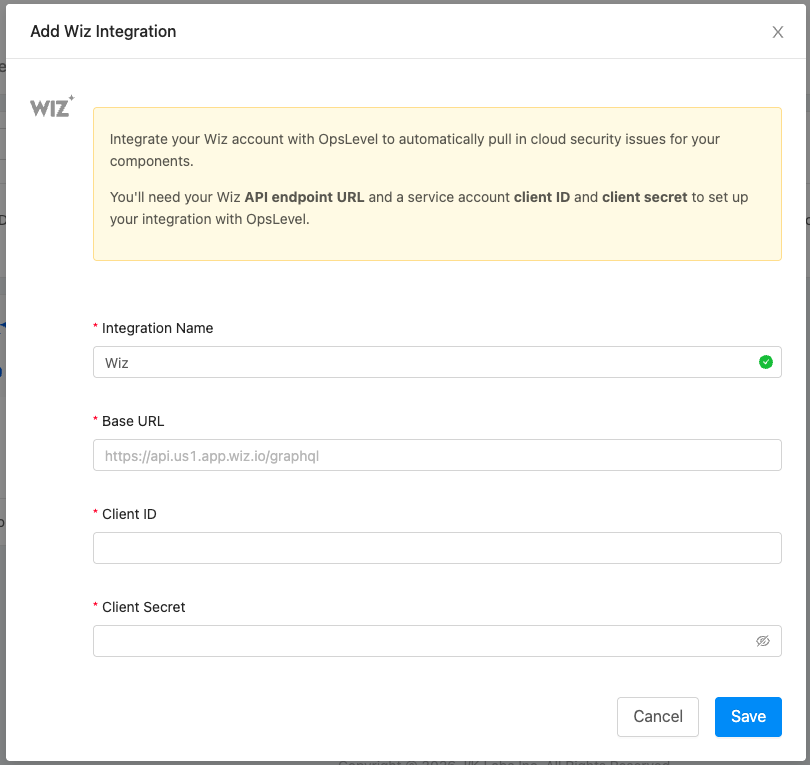
OpsLevel starts an initial sync as soon as the integration is created, and re-syncs once a day after that.
What OpsLevel imports
OpsLevel imports your Wiz Issues — every issue whose status is Open or In Progress, excluding issues Wiz has marked as INFORMATIONAL severity. Other Wiz object types, such as vulnerability findings, are not imported.
Each issue becomes a component of the Wiz Issue component type, named after the rule that raised it and the resource it was raised on — for example, Publicly exposed storage bucket on prod-assets.
Every Wiz Issue component gets:
- An alias of
wiz:<wiz issue id>, so the component is stable across syncs. - Tags for
source,wiz_severity,wiz_statusandwiz_issue_type, so you can filter and group issues anywhere in OpsLevel that supports tag filters. - A
cloud.servicetag naming the affected cloud resource, which is what OpsLevel uses to link the issue back to a service. See Linking issues to your services below.
The properties on each issue include:
| Property | Description |
|---|---|
| Severity, Status, Issue Type | The severity, current status, and kind of issue Wiz reported. |
| Detection Rules, Risks | The Wiz rules or controls that raised the issue, and the risks associated with them. |
| Description, Remediation | The rule's description and its recommended remediation steps. These are rendered on the component's Summary tab. |
| Compliance Frameworks, Compliance Mappings | The frameworks, categories and requirements the issue maps to. |
| Affected Resource, Resource Type, Resource Status | The cloud resource the issue was detected on. |
| Cloud Platform, Cloud Provider Id, Cloud Console Url, Region | Where the resource lives, and a link straight to it in your cloud provider's console. |
| Cloud Account Id, Cloud Account Name | The cloud account or subscription that owns the resource. |
| Wiz Projects | The Wiz projects the issue belongs to, with their business unit and business impact. |
| Tickets | Any tickets Wiz opened for the issue in an external ticketing system. |
| Detected At, Last Seen At, Status Changed At, Due At | The issue's timeline in Wiz. |
Linking issues to your services
Wiz reports the cloud resource an issue was detected on. OpsLevel copies that resource identifier onto the issue as a cloud.service tag, and then links the issue to any service that has a matching alias. The link shows up as an Affected Component relationship on the issue's Relationships tab, and the issue appears on the service's Relationships tab in return.
To get your Wiz issues attached to the right services, add the cloud resource identifier as an alias on the service that owns it. Issues whose resource identifier does not match any service alias are still imported — they just aren't attached to a service yet.
Managing the integration
From Integrations > your Wiz integration you can:
- Rename the integration.
- Update the Base URL and Client ID in place, and set a new Client Secret — useful when you rotate the credentials of the Wiz service account.
- Review any warnings raised during a sync, such as authentication failures or errors returned by the Wiz API.
- Delete the integration.
Good to know
- Your catalog tracks the state of Wiz. When an issue is resolved in Wiz it drops out of the sync, and OpsLevel removes the component it created for that issue on the next sync.
- Maturity is turned off for the Wiz Issue component type, so rubric checks are not run against Wiz issues.
- If your service account is scoped to specific Wiz projects, OpsLevel only imports the issues in those projects.
- The integration authenticates against Wiz's commercial authentication endpoint (
https://auth.app.wiz.io/oauth/token). Tenants that authenticate elsewhere are not supported today — this includes Wiz for Gov (https://auth.app.wiz.us), Wiz on AWS GovCloud (https://auth.gov.wiz.io), and older tenants still on Wiz's Auth0 endpoint (https://auth.wiz.io). These tenants can still import their Wiz issues into OpsLevel by using a Custom Integration.
To learn more about Wiz, check out their documentation.
Updated 2 months ago