

Introducing OpsLevel
One place to understand your software, hold it to a high standard, and get work done, whether people or agents are doing it.
What is OpsLevel?
OpsLevel gives engineering organizations one place to understand their software, hold it to a high standard, and get work done. It started as an internal developer portal, and today it also supports the way engineering is changing: people and agents working together across your agentic SDLC.
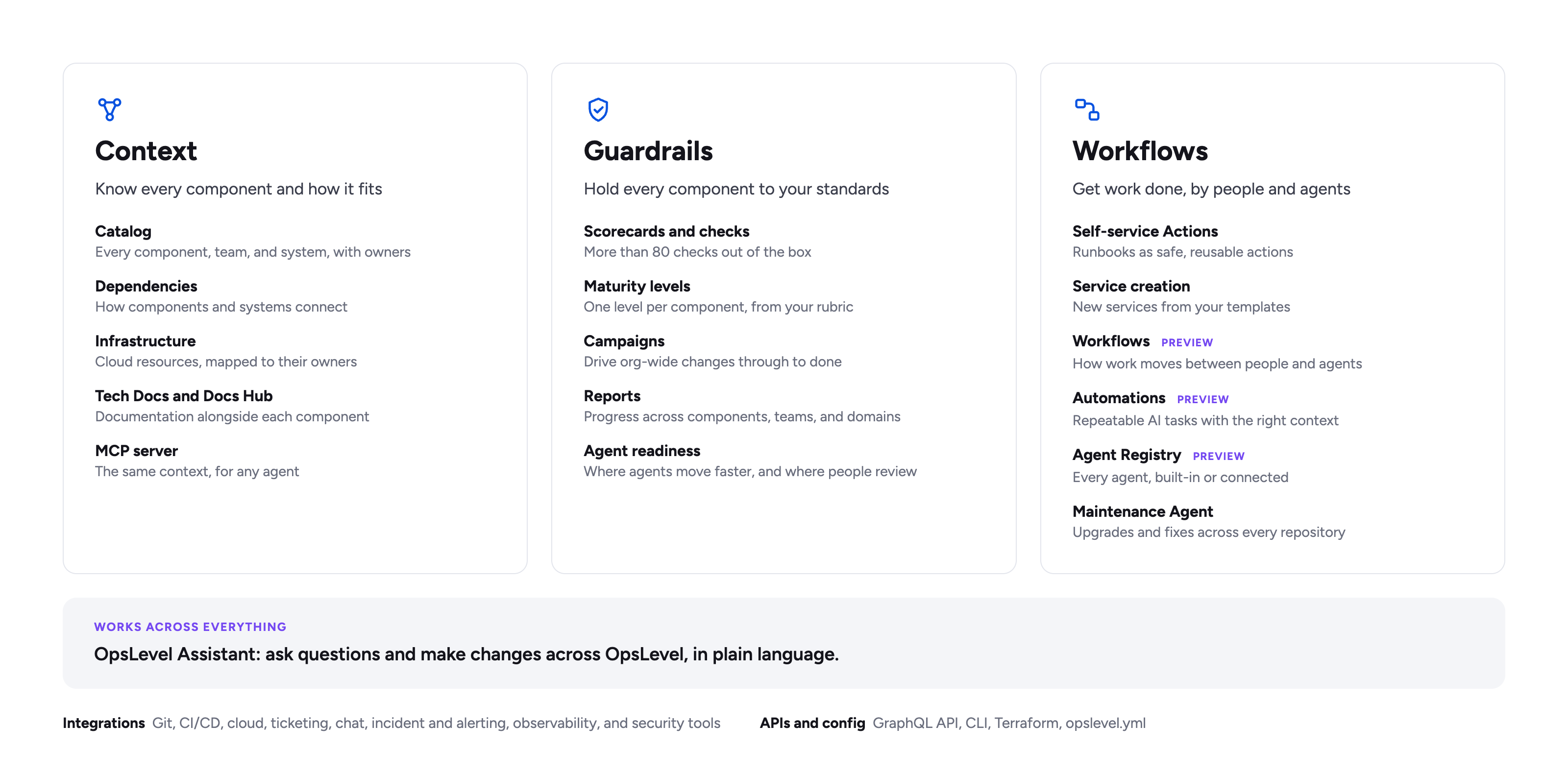
OpsLevel is organized around three areas, with the OpsLevel Assistant working across all of them.
Context
Know every component, who owns it, and how it fits with everything else. The catalog keeps that record up to date, so engineers find answers fast, and agents understand how a change affects the rest of your systems, beyond a single repository.
- Connect your Git provider: GitHub, GitLab, Bitbucket, or Azure DevOps.
- Optionally, add an opslevel.yml file to a repository for richer metadata.
- OpsLevel maps components and their dependencies, flags unregistered services, and fills gaps with AI-generated descriptions.
- Bring in infrastructure from AWS, Azure, and Google Cloud, mapped to its owners.
- Tech Docs and Docs Hub keep documentation alongside each component.
- The MCP server gives any agent the same context.
Guardrails
Hold every component to your standards. Scorecards and checks give each one a living report card: OpsLevel ships more than 80 checks out of the box, covering security, reliability, and compliance, and can suggest new AI-generated checks based on your repositories.
- Automated checks gather information about the quality and configuration of each component.
- A rubric and scorecards organize your checks and roll them up into an overall level for each component.
- Campaigns drive and measure org-wide changes, like adopting a new standard or upgrading a library.
- Reports show progress across your components, teams, and domains.
The same standards also show which services are ready for agents to change, and where a person should review first.
Workflows
Get work done, by people and agents.
Self-service
Actions turn runbooks into safe, reusable actions, with optional approvals through Slack, email, or PagerDuty. Service creation starts new services from your templates.
Popular uses:
- Overriding a deploy freeze: BigPanda cut approvals from 90 minutes to about 2
- Creating a compliant S3 bucket through Terraform
- Rolling back a bad release
Workflows, Automations, and the Agent Registry
In previewWorkflows, Automations, and the Agent Registry are in preview. To request access, book a demo or contact your OpsLevel account team.
- Workflows define how work moves between people and agents: what starts it, the steps it goes through, and where a person approves. Every run is recorded step by step.
- Automations are repeatable tasks done by an AI agent, each set up with the agent, model, and context it needs, on their own or as workflow steps.
- The Agent Registry tracks every agent your teams use, built into OpsLevel or connected from the platforms you use.
Start with the overview, get started with a first workflow, or browse use cases and examples.
Maintenance Agent
Maintenance Agent plans and ships fleet-wide changes, like library upgrades and fixes, across every affected repository, with your teams reviewing each change.
OpsLevel Assistant
Ask questions and make changes across OpsLevel in plain language, from finding who owns a service to creating a new component type or building a workflow.
Integrations and APIs
OpsLevel connects to the tools your teams already use, including Git providers, CI/CD, cloud providers, ticketing, chat, incident and alerting, observability, and security tools. See Integrations for the full list, and to build your own.
To work with OpsLevel programmatically, use the GraphQL API, the CLI, Terraform, or config as code with opslevel.yml.
Try it yourself
Want a closer look? Book a demo.
Updated 14 days ago